 By Mark
 In the rapidly evolving ecosystem of modern web development, achieving a balance between “simplicity” and “diversity” is a formidable challenge. This is especially true when attempting to unify the dozens of fragmented utility tools—JSON formatters, base64 converters, color pickers, and AI chats—that developers, designers, and office professionals rely on daily.
We often find ourselves bookmarking fifty different websites, each serving one specific purpose, often laden with ads or questionable data policies. The realization of this fragmentation was the spark that ignited the DeskTools Implementation project.
The journey of the DeskTools Implementation is not just about creating tools but about redefining how we interact with technology. Through innovative solutions, the DeskTools Implementation fosters a seamless experience for users.
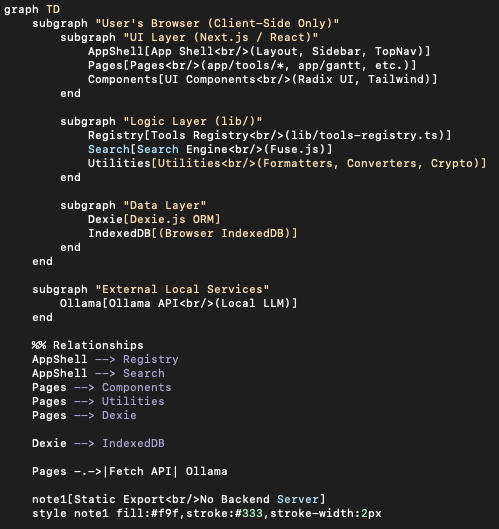
The goal was ambitious yet simple: Create a unified platform containing over 50 essential utilities, all running strictly on the client side, with zero data leakage.
In the realm of DeskTools Implementation, we are also exploring user feedback to continuously enhance our platform.
In this post, I will share the journey of building Desk-tools using Next.js 15 and TypeScript. Beyond a simple feature list, we will dive deep into the architectural decisions, the reasoning behind the tech stack, and how to engineer a scalable system that manages a vast array of tools.
Related Posts:
- Planning Phase: DeskTools Planning – Project 2 Step 1
- Implementation Phase: DeskTools Implementation – Project 2 Step 2
- The Service & Launch : DeskTools Seervice – Project 2 Step 3
Table of Contents
1. The Project Philosophy: “Privacy-First, Client-Side Only”
The inception of Desk-tools was driven by a critical security concern.
As developers, we frequently handle sensitive data. When you paste a JWT token into a web-based debugger or format a JSON file containing customer PII (Personally Identifiable Information) on a random website, do you know where that data goes? In many cases, it is sent to a server for processing. Even if the service claims not to store logs, the data has left your machine.
The evolution of the DeskTools Implementation marks a significant milestone in our development journey.
Desk-tools was built on a non-negotiable principle: “What happens in the browser, stays in the browser.”
To ensure this, the entire architecture was designed to be Serverless in the truest sense. By adopting a specific Static Export strategy (output: "export"), we ensured that the application requires no backend logic to function. This approach eliminates the vector for server-side data leaks. Whether you are converting sensitive cryptographic keys or analyzing proprietary code, the computation happens 100% within your local JavaScript runtime. This philosophy is not just a feature; it is the foundation of user trust.
The commitment to excellence in our DeskTools Implementation reflects in every feature crafted.
The philosophy behind our DeskTools Implementation emphasizes simplicity while providing powerful functionalities.
The principles guiding our DeskTools Implementation prioritize user privacy and efficiency, making it a strong contender in the utility space.
As we advance with the DeskTools Implementation, we remain focused on user feedback and iterative improvements.
2. Selecting the Tech Stack: A Strategic Choice
Building a platform that is both performant and maintainable requires a robust foundation. Here is why I chose this specific stack for the DeskTools implementation.
Framework: Next.js 15 (App Router)
I chose the latest Next.js 15 to leverage the bleeding-edge capabilities of the modern web.
- React 19 Compatibility: Next.js 15 allows us to utilize the latest React features, optimizing rendering performance.
- App Router Structure: The file-system-based routing of the App Router is perfect for this project. With over 52 tools, managing routes manually would be a nightmare. The App Router allows us to structure the application intuitively, where each tool resides in its own directory (e.g.,
app/tools/[tool-id]/page.tsx). - Static Site Generation (SSG): As mentioned, the ability to export the entire app as static HTML/JS/CSS assets allows for incredible hosting flexibility and speed.
State & Storage: Dexie.js (IndexedDB)
Since we abandoned the backend server, we needed a way to persist user data—such as “Saved Notes,” “Gantt Chart Tasks,” or “Theme Preferences”—between sessions.
Local Storage is limited in size (usually 5MB) and synchronous, which can block the main thread. IndexedDB is the browser’s native solution for large-scale, asynchronous storage. However, the raw IndexedDB API is notoriously complex and verbose.
This is where Dexie.js shines. It acts as a wrapper around IndexedDB, providing a clean, chainable API that feels like using a modern ORM. In lib/db.ts, I defined a schema that handles the persistence layer for the entire application, allowing users to save complex datasets locally without ever touching a remote database.
UI Architecture: Tailwind CSS + Radix UI
For a utility belt, the interface must be utilitarian yet beautiful.
- Radix UI: We used Radix for the unstyled UI primitives. It handles the hard parts of UI development—accessibility (a11y), keyboard navigation, and focus management—ensuring the app is usable by everyone.
- Tailwind CSS: Tailwind allowed for rapid styling and a consistent design system. It pairs perfectly with Radix, giving us the freedom to implement a custom look on top of accessible logic.
- Lucide React: A consistent iconography library that keeps the UI clean and intuitive.
3. DeskTools Implementation – Core Architecture: The Scalable Tool Registry System
The biggest challenge in building a “multi-tool” platform is maintainability. If adding a new tool requires modifying five different files (the sidebar, the search index, the routing file, etc.), the project will quickly become unmanageable.
To solve this, I implemented a Centralized Registry Pattern. The file lib/tools-registry.ts acts as the “brain” of the project.
The Registry Pattern
Every tool in the application is defined as an object within a master array. This single source of truth dictates the application’s structure.
TypeScript
// lib/tools-registry.ts Example
export const TOOLS_REGISTRY: Tool[] = [
   {
     id: "json-explorer",
     name: "JSON Explorer",
     category: "formatter",
     path: "/tools/json-explorer",
     description: "Visualize and format complex JSON data...",
     keywords: ["json", "parser", "viewer"],
     // ... additional metadata
   },
   // ... over 52 additional tools defined here
 ];
The beauty of this architecture is its scalability. When I want to add a 53rd tool, I simply:
- Create the page component in
app/tools/. - Add one object to
TOOLS_REGISTRY.
Once added, the new tool automatically appears in the sidebar navigation, the dashboard card list, and the global search index. This reduces the overhead of expansion to almost zero.
The Magic of Common Layouts: tool-layout.tsx
With the DeskTools Implementation, we have brought innovative ideas to life through dedicated development.
To ensure a consistent user experience (UX) across diverse tools—from a simple calculator to a complex AI chat interface—I designed a Higher-Order Component (HOC) wrapper located at components/tool-layout.tsx.
Our DeskTools Implementation approach is unique, focusing on user-centric design and powerful functionalities.
This wrapper encapsulates common elements:
- The tool’s header and description.
- The “Add to Favorites” toggle button.
- Responsive container padding.
By wrapping every tool page with this component, users feel a sense of cohesion. They know exactly where to look for instructions or settings, regardless of which specific utility they are currently using.
4. Key DeskTools Implementation Challenges & Solutions
The DeskTools Implementation is not just a project; it’s a vision for the future of tools.
Developing 50+ tools presented unique technical hurdles. Here are a few standout examples.
4.1. Local AI Integration (Ollama)
With the ongoing DeskTools Implementation, we aim to provide users with the tools they need at their fingertips.
One of the most exciting features recently added is the integration with Ollama.
Traditionally, AI features require an API key and sending data to OpenAI or Anthropic servers. Staying true to our Privacy-First philosophy, Desk-tools connects directly to the user’s local Ollama instance (usually running on localhost:11434).
We utilize the browser’s fetch API to communicate with the local LLM. This allows users to perform tasks like “Summarize this sensitive document” or “Refactor this proprietary code” completely offline, with zero risk of data exposure.
4.2. Handling Complex Data (JSON Explorer & Code Formatter)
Rendering large datasets in the browser can cause UI freezing (jank). For the JSON Explorer, we had to implement virtualization techniques. Instead of rendering a 10,000-line JSON file all at once, we only render what is currently visible in the viewport.
Furthermore, we separated the heavy lifting—such as code formatting logic—into utility libraries (e.g., lib/code-formatter.ts). This separation of concerns (Business Logic vs. UI Logic) ensures that the interface remains snappy even when processing heavy computations.
4.3. Precision in Design Tools
For tools like the Color Picker and Placeholder Image Generator, accuracy is paramount.
Through the DeskTools Implementation, we seek to empower users by providing them with powerful tools in a single platform.
The DeskTools Implementation ensures that every user interaction is both intuitive and productive.
We leveraged the HTML5 Canvas API to generate images on the fly within the client. For the color tools, we implemented real-time conversion algorithms between HEX, RGB, HSL, and CMYK. Using Radix UI’s Slider primitives allowed us to create granular controls that feel native and smooth, providing designers with the precision they need.
5. Performance Optimization and User Experience (UX)
A utility site must be fast. If it takes 5 seconds to load a UUID generator, the user is already gone.
- Fuzzy Search: With over 50 tools, finding the right one can be tricky. We integrated Fuse.js to implement fuzzy searching. Even if a user types “base65” instead of “base64”, or “parse” instead of “formatter”, the system intelligently deduces intent and presents the correct tool immediately.
- Internationalization (i18n): Desk-tools is designed for a global audience. We structured a
localesdirectory to support Korean, English, Japanese, and Chinese. Thei18n-provider.tsxallows for seamless runtime language switching without page reloads. - Dark Mode: Recognizing that developers often work in low-light environments, we utilized
next-themesto implement a flicker-free dark mode that respects the system preference by default but allows manual toggling.
6. Conclusion and Future Roadmap
Desk-tools is more than just a collection of utilities; it is an experiment in how far we can push the modern web as a standalone application platform. By proving that we can build complex, data-intensive, and AI-powered applications without a backend, we highlight the maturity of the browser ecosystem.
We have successfully integrated 52 tools, but the journey is far from over. The roadmap for the future includes:
- Enhanced PWA (Progressive Web App): Truly bridging the gap between web and native. We aim to make Desk-tools installable with full offline capabilities, functioning exactly like a desktop application.
- Web Workers: To prevent the main thread from blocking during heavy tasks (like generating GIFs or processing large images), we plan to offload these computations to Web Workers.
- Community Plugin System: The ultimate goal is to open the platform. We are designing a structure that allows other developers to contribute their own tools easily, fostering a community-driven ecosystem.
Building Desk-tools has been a profound lesson in architecture, performance, and the importance of user privacy. It reaffirmed that with the right design patterns, we can build software that is both powerful and respectful of the user.
I hope Desk-tools becomes your go-to “digital workbench,” saving you time and keeping your data safe.