 By Mark
 For modern knowledge workers, browser tab fatigue is a chronic issue. While workflows vary across companies, the core friction remains the same: we frequently interrupt our flow to format JSON, remove image backgrounds, or perform simple calculations. We often find ourselves pasting sensitive data into unverified external websites to accomplish these tasks.
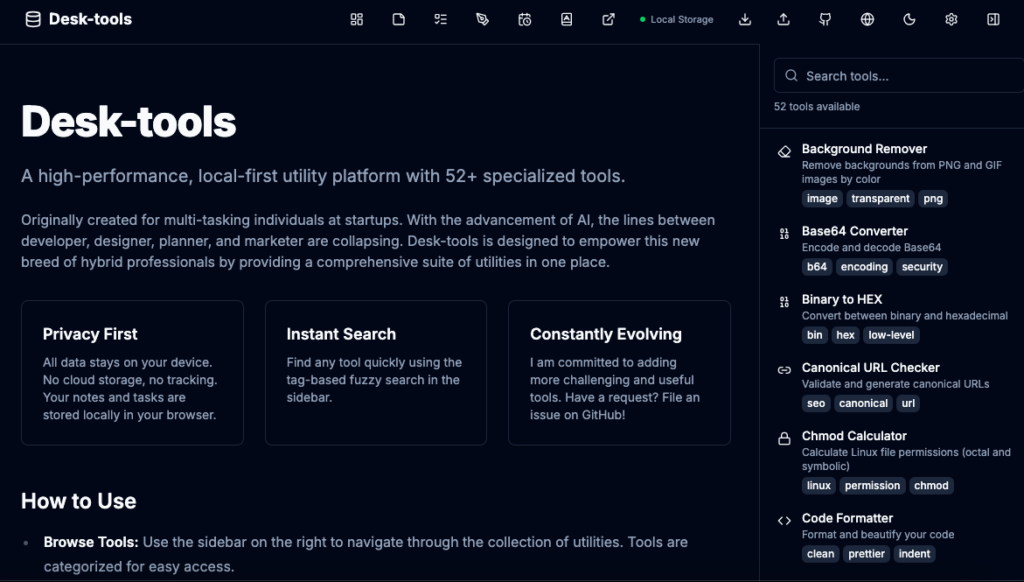
This fragmentation not only disrupts productivity but poses significant data privacy risks. To address this, I developed DeskTools Service—a suite of over 52 local-first productivity utilities, including the DeskTools Service. In this post, I will dissect the project’s architecture, exploring modern CI/CD strategies with GitHub Actions, and the implementation of Progressive Web Apps (PWA) to bridge the gap between web and mobile.
- Planning Phase: DeskTools Planning – Project 2 Step 1
- Implementation Phase: DeskTools Implementation – Project 2 Step 2
- The Service & Launch : DeskTools Seervice – Project 2 Step 3
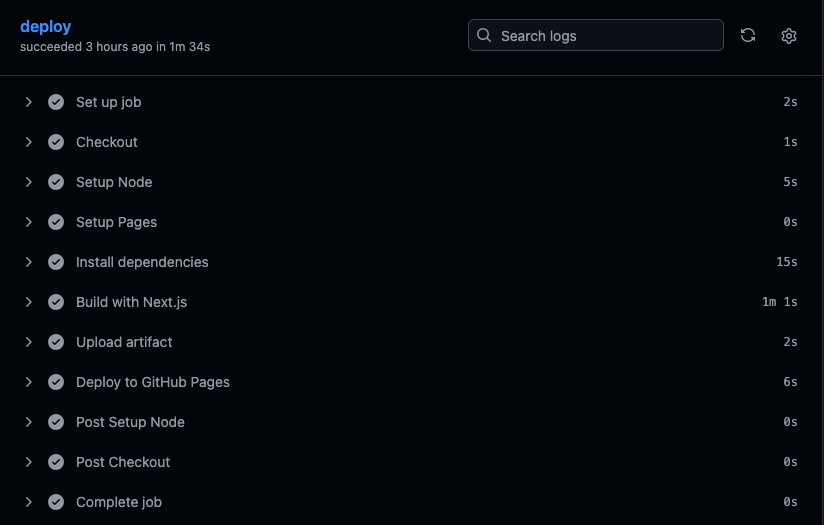
Table of Contents
1. DeskTools Service Foundation: Local-First Software Architecture
One of the most significant paradigm shifts in recent software development is the “Local-First” approach. Unlike cloud-centric apps that treat the browser merely as a display terminal for server-side data, Local-First applications process and store the majority of logic and data directly on the user’s device.
Why Local-First?
- Data Sovereignty (Privacy): User data never leaves the device. Whether it’s a memo or a Kanban board state in DeskTools, everything remains within the browser’s IndexedDB.
- Offline Availability: The application remains fully functional regardless of network status.
- Zero Latency: By eliminating the server round-trip, interactions are instantaneous.
Core Technology: IndexedDB & Dexie.js
Traditional localStorage is ill-suited for complex applications due to its 5MB storage limit and synchronous (blocking) nature. Instead, DeskTools utilizes IndexedDB, a low-level API for client-side storage of significant amounts of structured data. To manage this efficiently, I implemented Dexie.js, a wrapper library that ensures data integrity and provides a cleaner syntax for asynchronous NoSQL operations within the browser.
2. Modern CI/CD: Theory and Practice with GitHub Actions
Building software is only half the battle; delivering it safely and rapidly is the other. This is where CI/CD (Continuous Integration and Continuous Deployment) becomes critical.
What is CI/CD?
- Continuous Integration (CI): The practice of automating the build and testing of code every time a developer commits changes to the repository, ensuring code quality.
- Continuous Deployment (CD): The automatic release of validated code to the production environment.
GitHub Actions: Event-Driven Automation
GitHub Actions executes workflows based on specific repository events (Push, Pull Request, etc.). DeskTools utilizes a deploy.yml configuration to establish a robust deployment pipeline:
YAML
# DeskTools Deployment Pipeline Summary
jobs:
   deploy:
     runs-on: ubuntu-latest
     steps:
       - name: Checkout # Retrieve source code
         uses: actions/checkout@v4
       - name: Setup Node # Configure Node.js environment
         uses: actions/setup-node@v4
         with:
           node-version: "20"
           cache: 'npm'
       - name: Build with Next.js # Static Site Generation (SSG)
         run: npm run build
         env:
           NEXT_PUBLIC_BASE_PATH: /Desk-tools
       - name: Deploy to GitHub Pages # Deploy to server
         uses: actions/deploy-pages@v4
This automation allows me to focus entirely on algorithm optimization rather than infrastructure management, effectively eliminating 100% of human error during deployment.
3. Bridging the Gap: The Magic of PWA (Progressive Web ApShutterstock
Developing native applications for both iOS and Android requires significant resources. DeskTools Service adopts PWA technology to deliver a native-app-like experience to mobile users using a single web codebase.
The Three Pillars of PWA
- Service Worker: A script that runs in the background, separate from a web page. It intercepts network requests and manages caching, enabling the app to load instantly—even offline.
- Manifest File (
manifest.json): Defines the app’s metadata (name, icons, theme colors), allowing users to install the website to their home screen as a standalone app. - HTTPS: Security is a prerequisite for PWAs. Service Workers only function over secure connections (standard on GitHub Pages).
Mobile UX Optimization
DeskTools leverages Tailwind CSS for responsive design. The UI dynamically adapts from a broad sidebar layout on desktop to a bottom tab bar or hamburger menu on mobile, ensuring a seamless experience across devices.
4. Serverless, Server-Grade Performance: Next.js 15 & Static Exports
The engine powering DeskTools Service is Next.js 15, which supports the latest React 19 features. Crucially, the project is configured with output: 'export'.
Advantages of Static Export
Unlike standard Next.js apps that require a Node.js server, Static Export pre-renders every page into HTML during the build time.
- Security: With no server-side code executing at runtime, the attack surface is minimized (e.g., no SQL injection vulnerabilities).
- Cost Efficiency: The site can be hosted entirely for free on static hosting services like GitHub Pages.
- Scalability: Files are served via CDNs, ensuring high availability and low latency regardless of traffic spikes.
5. Future-Proofing: Local AI (Ollama) Integration
The most recent innovation in DeskTools Service is the AI Chat feature. Traditionally, AI integration requires sending user data to external APIs (like OpenAI). DeskTools, adhering to its local-first philosophy, integrates with Ollama running locally on the user’s machine.
This architecture proves that we can leverage powerful LLMs without compromising privacy. By using the browser’s fetch API to communicate with localhost:11434, DeskTools Service ensures that sensitive prompts never leave the user’s local network.
6. Conclusion: Where Automation Meets Innovation
DeskTools is more than just a collection of utilities; it is a convergence of modern web technologies:
- GitHub Actions for uninterrupted automation.
- PWA for cross-platform accessibility.
- Local-First Architecture for absolute data sovereignty.
When these three pillars combine, developers can deliver maximum value with minimal friction. I encourage you to build your own tools and automation pipelines. The technical growth you achieve in the process will be as valuable as the software you create.