 By Mark
 Blurring the Lines: Why I Built DeskTools for the Era of the “Hybrid Specialist”
It’s 2026, and the biggest shift I’m seeing lately is the “dissolution of job boundaries.” Finding myself constantly juggling different roles is exactly what pushed me to kick off the DeskTools Planning project.
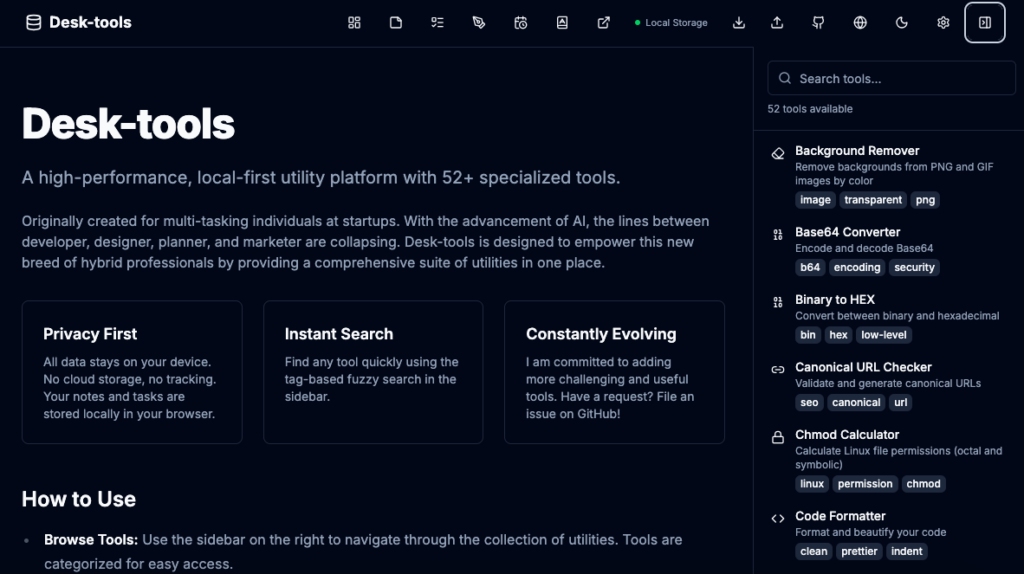
I’m planning to break this story down into three parts:
- The Planning (https://codeforlife.xyz/desktools-planning-project-2-step-1-code-for-life)
- The Implementation
- The Service & Launch
The Rise of the Hybrid Specialist
Gone are the days when roles were strictly siloed—planners wrote docs, designers drew, and developers coded. Now that AI has skyrocketed productivity, we’re shifting into an era of “Hybrid Specialists.” Anyone can be a planner or an engineer depending on the moment. Especially for startups or solo founders, this “One-Man Army” capability is a survival skill.
But let’s be real—it’s exhausting. To pull off this one-man show, we’re drowning in dozens of browser tabs, constantly logging in and out of different services. This endless Context Switching is eating away at our focus.
I realized that multitasking is a myth. It doesn’t exist. It’s really just about how fast and efficiently you can switch contexts.
That’s why I started DeskTools Planning. I wanted to build an integrated digital workspace designed to handle that entire workflow on a single page.
1. The Essence of DeskTools Planning: Why “Integration”?
Our brains burn a ton of energy every time we switch tasks. You know the feeling—you’re coding logic, then you stop to find a color picker, then you open a notepad to jot down an idea. That “switching cost” kills your flow.
Honestly, DeskTools Planning began as a selfish project. I am terrible at switching tasks, so I needed a weapon to compensate for my own weakness.
I hit on a key insight: “Fragmented tools drain us.” So, the core question driving DeskTools Planning was simple: Can I cram all the major features and micro-tools that every pro needs into one single interface?
It’s not just a collection of tools; it’s about preserving your flow of thought.
2. The 7 Pillars: The Engine Defined by DeskTools Planning
During the DeskTools Planning phase, I decided that this shouldn’t just be a utility belt—it needed to be a workstation. Here are the 7 core modules that keep my day running:
- 📋 Kanban: Visual Control. The scariest part of managing multiple projects alone is forgetting things. This drag-and-drop board sits right next to your tools.
- 📝 Notepad: More than just text. Markdown support is standard. Whether it’s code snippets or draft planning, everything saves right in your browser.
- ✅ Tasks: The Nitty-Gritty. If Kanban is the macro view, Tasks are for the micro-stuff I need to clear today.
- 🎨 Whiteboard: Sketching Ideas. Sometimes words aren’t enough. I needed a place to sketch wireframes or diagrams instantly.
- 📅 Schedule: Time is Survival. Prioritizing deadlines is crucial when you’re doing everything yourself.
- 📖 Terms: My Glossary. As a Staff Engineer, “term mismatch” was always a pain. I included this in the DeskTools Planning specifically to align concepts and prevent knowledge fragmentation.
- 🔖 Bookmarks: Curated Resources. Keep your API docs and references separate from your personal browser bookmarks.
3. The Muscle: 52+ Professional Tools
If the 7 pillars are the bones, the 52 utilities are the muscles. A key part of DeskTools Planning was curating these to solve those tiny, annoying problems we all face:
- Dev & Security: JSON Explorers, Text Diffs, and even local AES encryption/JWT Decoders for safe testing.
- Marketing & SEO: Checking Open Graph previews or generating sitemaps without leaving the page.
- Design: Quick background removers and icon generators because opening professional design software for small tasks is a hassle.
- Calculators: From IP subnet calculators to tax estimators. No more Googling for these.
4. Why “Local-First”? (My Philosophy)
DeskTools Planning wasn’t just about features; it was about philosophy. The tool runs on IndexedDB and LocalStorage.
In strict corporate environments or financial sectors, cloud tools are often blocked. Plus, sending sensitive code or data to an external server is a security risk.
DeskTools doesn’t send a single byte of data to a server. Everything happens in your browser. It’s secure, and it works perfectly even if you’re on a plane or offline.
5. Conclusion: From Struggle to Performance
The reason I started DeskTools Planning wasn’t just to make a “tool bucket.” I wanted a workstation for the limitless expert. Whether you’re a dev who worries about design, or a planner digging into data structures, this is for you.
Stop getting lost in the tab jungle. Design, verify, and execute on a single page. Let DeskTools handle the boring stuff so you can focus on what matters.
Check it out here: https://zafrem.github.io/Desk-tools
(Real talk: The service is already live and I’m actively using it, but I’m constantly adding more. I actually had a BMI calculator in there at first but deleted it… seemed unnecessary!)
Nowadays, people ask, “Why build this when AI can do it?” Maybe it’s just the stubbornness of an old engineer. But if you have ideas or tools you want to see, please drop an issue on GitHub. I’ll squeeze them in somehow!
Help me out!